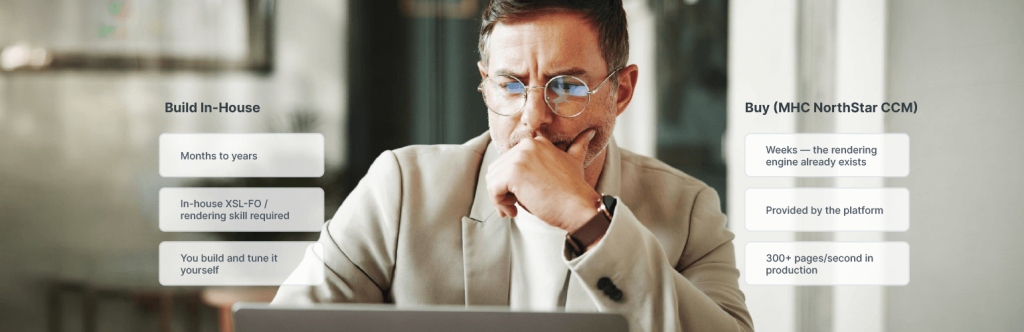
Build vs. Buy:The Ultimate Guide for Enterprise Document Generation Software
Shawn Phillips
September 21st, 2026
In Brief
For a low-volume document generation, building in-house can work. Once you’re generating regulated, high-volume output — statements, policy notices, EOBs — buying almost always wins. Purpose-built enterprise document generation platforms deliver rules-based compliance, accessibility built in from the start, and throughput that in-house builds take years of engineering time to approach, and often never fully reach.
Table of Contents
Introduction
Every software leader eventually runs into some version of the same question: should we build or buy a software solution? The answer is usually simple enough. Does a tool already exist that does what you need, or is it cheaper and faster to write the code yourselves?
Document generation is where that usually-simple question gets complicated. Generating a few hundred documents from a handful of templates is a small job. Someone designs the templates, connects the customer data, and a basic tool fills in the blanks. Producing ten million regulated documents a year is different work entirely.
Those documents go out in several languages, by print, by email, and through a customer portal, and each one needs a record that will satisfy an insurance regulator or a HIPAA auditor. At that point the work is no longer designing templates. It is building and running a system that has to stay correct as the rules change.
This article works through the build vs buy decision the way an IT or product leader actually needs to: what building really costs once you and what buying looks like in practice — including cases where “buying” means embedding a rendering engine into your own product rather than running a vendor’s tool internally.
Spoiler alert: if you’re deciding whether to build or buy document generation software for a genuinely high-volume, regulated environment, the short version is that buying usually wins.
Why Is Build vs. Buy Different for Document Generation?
The build-vs-buy analysis changes for document generation because the two things you’re weighing scale at completely different rates than they do for most business software.
Consider what an enterprise document generation platform actually does under the hood. Structured data — XML, JSON, or another format — comes in. A rules engine applies conditional logic: which clause appears for which jurisdiction, which disclosure language applies to which product line, which language variant a given customer receives.
The output goes out as a PDF, an email, an interactive HTML page, or a printed statement, often from the same underlying template. That’s three distinct layers of complexity — ingestion, transformation, and delivery — that a simple template-filling script never has to solve for.
Perform that for a hundred documents a month, and a simple solution will do. Perform it for the scale regulated industries actually produce — insurance policy documents, healthcare EOBs, financial statements running into the millions annually — and every shortcut becomes work that needs to be maintained indefinitely.
Document production software built for scale builds compliance and accessibility into the system itself, so they happen automatically and not after the fact.
INSIGHT FROM MHC
“Teams are good at estimating what it costs to build a document generation system. What they underestimate is what it costs to keep one running. Disclosure rules change constantly, and every change sends a developer back into the code to apply the change manually. And if accessibility wasn’t built into the template from the start, someone has to fix the documents by hand after every run.”
When Does Building Your Own Document Generation Make Sense?
Building document generation in-house makes sense in fewer situations than most vendors want to admit — but it does make sense sometimes, and it’s worth being honest about when.
There is one case where building clearly wins, and it depends on two conditions holding at the same time. You need both. The first is a data format or compliance requirement that’s genuinely unusual, and that no vendor has built for.
The second is that you already employ engineers who have done this specific work before — an XSL-FO rendering engine, PDF composition, the page-layout logic that decides where a page breaks and how a font renders.
If that experience is already on staff, and you are producing thousands of documents a year rather than millions, a custom document generation system can be the right call, at least for now.
There is a second version of building that is harder to admit to. A team already has something that mostly works, put together years ago, and nobody wants to be the person who suggests replacing it. That is not a build decision. It is a decision nobody has made yet, and it is worth separating the two before assuming the current setup is still the right answer, rather than just the easiest thing to keep doing.
The honest test is whether document generation is core to what makes your product different, or whether it’s infrastructure someone else has already solved well. For most organizations producing regulated, high-volume output, it’s the latter — which is where buying starts to look different.
When Should You Buy Document Generation Software?
Buying document generation software is the right call once volume, compliance complexity, or channel variety outgrows what a small internal team can realistically maintain — which, for most regulated, high-volume organizations, happens sooner than the initial build estimate assumed.
The practical case for buying comes down to speed and specialist knowledge. A platform built specifically as one of the document generation solutions serving regulated industries arrives with the rendering engine, the compliance controls, and the accessibility tagging already solved; a build starts all three from zero.
You see that difference immediately in how long it takes to go live — weeks instead of months or years — and you see it again every time a regulation changes, a new channel gets added, or an auditor asks how a particular disclosure was produced for a particular customer eighteen months ago.
Buying doesn’t have to mean running a vendor’s software as a separate tool alongside your own. Some organizations license the underlying rendering engine and embed it directly inside their own product, so document generation ships as part of their platform rather than a separate purchase their own customers have to manage.
Procore Technologies and a MarTech publishing platform both took exactly that approach — two examples worth walking through in detail later in this piece.
INSIGHT FROM MHC
“Most teams are surprised by how much of this work has nothing to do with their own product. Someone has to write the code that reads the data, decide where each page breaks, make sure the fonts come out right, and tags the document so a screen reader can read it properly. None of that is what their customers are paying them for.”
Customer Story: How Procore Scaled Document Generation Without Building Its Own Engine
Procore Technologies, whose construction management platform serves more than 17,000 customers moving over a trillion dollars in construction volume, generates more than 365 million document pages a year — contracts, change orders, inspection forms, invoices — without running a rendering engine of its own.
The Challenge
- Procore’s problem wasn’t volume by itself — it was variability, since each customer needed contracts and compliance packets that reflected their own branding, legal language, and project-specific details.
- Customers wanted the ability to make those changes themselves, rather than filing a ticket with Procore’s engineering team every time something needed to change.
- Pagination, fonts, and barcodes needed to come out exactly right, since construction and financial documents don’t tolerate approximate formatting.
- All of it needed to happen without slowing down the platform Procore’s own customers use every day.
The Solution
- Procore embedded MHC NorthStar CCM directly into its platform rather than building a rendering layer internally.
- Rules-based, configurable templates let conditional logic decide which content applies to which customer.
- Automated template selection picks the right branding and legal language for each document request without a developer in the loop.
- Standards-based rendering produces PDF/A-compliant output, which matters in an industry where a malformed contract is a legal problem, not just a formatting one.
The Results
- Customers edit their own templates, which frees Procore’s product team to build product instead of maintaining rendering logic.
- The platform handles tens of thousands of customer-specific templates alongside hundreds of Procore’s own standard ones, even during peak activity.
- Procore generates more than 365 million document pages annually while supporting more than 17,000 customers and over a trillion dollars in construction volume.
- Procore has been an MHC customer since 2012.
Build vs. Buy: A Software Decision Matrix for Document Generation
Every build or buy software decision — build vs buy, buy vs build, whichever way you say it — eventually gets reduced to a table, and that’s not a bad instinct. Before getting there, it helps to break the decision into four pieces: the factors that actually matter, the side-by-side comparison itself, how the calculation shifts at enterprise scale, and the pros and cons once you’ve weighed it all.
Build Versus Buy Analysis: The Four Factors That Actually Move the Needle
A generic build versus buy analysis — the kind built for choosing a CRM or a marketing tool — tends to leave out the factors that matter most for document generation. A useful build vs buy software analysis for this category comes down to four checks:
- Rendering-engine expertise — do you have people with experience building a rendering engine? Not staff with generic software engineering skills, but specific, hands-on experience with formats like XSL-FO, PDF composition, and the pagination and layout logic that govern how a document actually renders. This is a narrow specialty, and most engineering teams have little exposure to it outside of a dedicated document generation project.
- Compliance velocity — how fast can you get a rule change into a live document? Regulations governing insurance disclosures, healthcare correspondence, and financial statements change regularly, and the real test is how quickly a change in one jurisdiction is updated in every document where it needs to change.
- Accessibility cost — is accessibility built into the template, or fixed afterward? Requirements like PDF/UA and WCAG 2.1 either happen automatically when a document is created, or someone goes through the finished documents and fixes them, every batch. The second costs far more over time, even though it looks cheaper at the start.
- Delivery complexity — How many ways does the document have to go out? One format for one channel is straightforward. The same content going to print, email, SMS, and a customer portal, each with its own formatting and delivery rules, means a build does four times the work a purpose-built platform does once.
Answer those four questions honestly, and the two options stop looking evenly matched. Weigh the build vs buy software development costs, benefits, and risks for regulated document generation, and buying comes out ahead far more often than a general build-or-buy comparison would predict.
The Build vs. Buy Decision Matrix
Rather than treating this as an abstract trade-off, it helps to see exactly where a custom build and a purpose-built platform diverge — from the first weeks of implementation through the ongoing work of keeping the system compliant and accessible.
The build vs buy decision matrix below lines up nine of the factors that most often separate a smooth document generation rollout from one that quietly becomes an engineering liability:
| Evaluation Factor | Build In-House | Buy (MHC NorthStar CCM) |
|---|---|---|
| Time to go live | Months to years | Weeks — the rendering engine already exists |
| Engineering expertise required | In-house XSL-FO / rendering skill required | Provided by the platform |
| Throughput at scale | You build and tune it yourself | 300+ pages/second in production |
| Data formats accepted | You write code for each new format | XML, JSON, XSL-FO, CSV, SQL — converted into one common format (normalized) |
| Accessibility | Manual remediation by hand, for every batch | PDF/UA, Section 508, WCAG 2.1, EAA — applied pre-composition |
| Rule changes | A developer changes code for every new rule | Rules-based — update it once, applied everywhere |
| Omnichannel delivery | Separate build per channel | One composition → print, email, SMS, portal, archive |
| Deployment | You own the servers and the governance | AnyPrem — cloud, on-premises, or hybrid |
| Ongoing maintenance | Permanent internal engineering burden | Vendor-owned; SOC 2 Type 2 certified |
Swipe to see more →
Why the Build vs Buy Enterprise Software Comparison Changes at Scale
Most build vs buy enterprise software advice treats scale as a simple multiplier — more users, more transactions, proportionally more cost either way. Regulated document generation doesn’t work that way. Every new requirement gives a build one more thing to handle separately, while a rules-based platform takes the same change once, and applies it everywhere:
- A new jurisdiction means a new set of rules a build has to code for — and one more template variant on a platform already built for rules-based composition.
- A new disclosure requirement means an engineering ticket on a build — and a single rule change, applied automatically across every affected document, on a platform.
- A new delivery channel means a separate build effort — and one more output format from the same composition, on a platform.
That is why the standard enterprise build-vs-buy comparison tends to underweight buying for this category: it wasn’t written with compliance-driven document generation in mind.
Buy vs. Build Software: Pros and Cons for Document Generation
Put plainly, whether building or buying makes more sense for document generation software depends heavily on where you sit — and the pros and cons shift accordingly. Here’s how they break down for a low-volume, unique use case versus regulated, high-volume document generation.
Low-Volume, Unique Use Case
| Low-Volume, Unique Use Case | Pros | Cons |
|---|---|---|
| Building |
|
|
| Buying |
|
|
Swipe to see more →
Regulated, High-Volume Document Generation
| Regulated, High-Volume Document Generation | Pros | Cons |
|---|---|---|
| Building |
|
|
| Buying |
|
|
Swipe to see more →
For a genuinely unique, low-volume use case, that trade can go either way. For regulated, high-volume document generation, it rarely does.
INSIGHT FROM MHC
“Where a team lands depends almost entirely on two things: how many documents they produce, and how tightly those documents are regulated. A few thousand straightforward documents a year, and building is reasonable. Millions of them, under rules that change every quarter, and they’re signing up for permanent maintenance.”
~ Reuben Manalo, Director of Sales Engineering, MHC
Which raises the next question: what does building actually cost?
The True Cost of Building In-House
Building document generation in-house costs far more than the initial engineering estimate suggests, and almost all of the difference shows up after the launch.
Most teams estimate the cost of building a document generation system and price the parts that show up on a project plan: developer time, a rendering library, maybe a QA pass. The costs that actually sink these builds tend to live somewhere else entirely.
- Initial engineering — the rendering engine, parsers, and template tooling that have to be built before the system produces a single usable document.
- Specialist expertise — XSL-FO and composition knowledge that is genuinely hard to hire for and even harder to retain once the person who built the system moves on.
- Compliance maintenance — every regulatory change becomes an engineering ticket, indefinitely, for as long as the system is in production.
- Accessibility remediation — a recurring, per-batch cost when accessibility isn’t built into the template from the start.
- Scale and performance work — tuning the system for peak batch runs and real-time load as volume grows past what the original architecture assumed.
- Opportunity cost — engineers spending their time on document plumbing instead of the product features that actually differentiate your business.
INSIGHT FROM MHC
“Accessibility is the one that surprises people. If you build it into the template, it happens automatically every time a document is created. If you don’t, someone has to go through the finished documents and fix them, and then do it again for the next batch. The more documents you produce, the more that costs you.”
None of this is unique to document generation — it’s a pattern that shows up across custom software generally. A McKinsey and University of Oxford study of more than 5,400 large IT projects found that they run 45% over budget on average, while delivering 56% less value than originally predicted (McKinsey & Company, 2012). Document generation does not escape that pattern just because the requirements feel well understood at the outset — if anything, compliance and accessibility obligations are exactly the kind of scope that tends to be underestimated going in.
What Buying Looks Like With MHC NorthStar CCM
Buying document generation software, in MHC NorthStar CCM’s case, means an architecture built around three layers: ingestion, transformation, and delivery. As part of the enterprise document generation platform, the system accepts XML, JSON, XSL-FO, and other structured formats and normalizes them into one common format.
A deterministic rules engine — not AI making judgement calls — decides what content and what compliance wording belongs in each document. Then it produces whatever output the situation calls for, all from the same setup.
That any-input-to-any-output design, capable of taking XML or JSON to PDF at That ability to take any of those formats in and produce any of them out, including XML or JSON to PDF at scale, is what separates it from a lightweight PDF API, which really just renders one input type.
In production, that architecture runs at more than 300 pages per second and supports more than 10 billion pages generated annually across MHC’s deployments. Accessibility tagging applies at the template level before a document is ever composed, rather than as a remediation pass afterward.
That pre-composition approach covers PDF/UA, Section 508, WCAG 2.1, and the European Accessibility Act. Deployment options span cloud, on-premises, and hybrid, which matters for organizations with data residency requirements a pure SaaS platform can’t accommodate.
You can run it in the cloud, in your own data center, or both, which matters if you have rules about where your data is allowed to live that a cloud-only platform cannot meet. Teams who would rather not hand-code templates can build them visually in the Visual XSL-FO Designer.
“MHC has been a great partner in figuring out our issues, to understand our business, to understand what we’ve been trying to accomplish, to understand the things that we are doing with the tool that again may not be in documentation, that may not be something that you all planned on. We found that MHC is part of our team.”
Organizations considering an embedded or licensed approach rather than a standalone deployment — Procore’s and the MarTech publishing platform’s path, described next — can review MHC’s partner program for that specific route.
INSIGHT FROM MHC
“The question I get most often is what happens when the same letter has to go out by mail, by email, and into a portal. When one setup feeds all three, that stops being three separate builds. It’s usually the piece teams were dreading building themselves.”
Customer Story: How a MarTech Platform Cut a Nine-Month Document Cycle to Days
A leading MarTech company and data-driven publishing software provider ran into a subtler version of the same problem: not volume, but what its own team came to call “variability debt.”
The Challenge
- The logic that produced documents was originally written directly into the company’s own application, tightly tied to live pricing, regulatory requirements, and brand standards.
- As the platform grew, different types of users needed different pricing, messaging, and imagery, while live product data kept changing underneath them.
- New industries brought new regulatory requirements, and thousands of distributed users needed to generate materials at the same time.
- Every minor content change had started requiring a full application release — at its worst, a single, nearly 500-page document took nine months of manual effort to produce.
The Solution
- The company re-architected around MHC NorthStar CCM as shared document infrastructure, rather than continuing to build rendering logic into the application.
- It kept ownership of the user experience, the workflows, and the business logic, while MHC NorthStar CCM took over rendering, layout, and production.
- Structured data flows into MHC NorthStar CCM, which applies the rules, handles page brakes, and renders at volume, then hands finished output back into the company’s own workflow.
“We didn’t want rendering logic tied to release cycles. We wanted the freedom to evolve templates without touching core product code. Treating document generation as a shared service infrastructure gave us both. “
~ Senior Executive, MarTech Publishing Software Provider
The Results
- Kept a publishing architecture more than twenty years old running, without rebuilding the part that produces documents (document layer).
- Cut a 500-page publication cycle from nine months of manual effort to days.
- Kept its engineering team focused on the product instead of the rendering pipeline underneath it.
Choosing Which Cost to Carry - Build vs. Buy Conclusions
Build vs. buy for document generation isn’t really a coin flip between two equally good options — it’s a bet on which kind of cost you’d rather carry.
Building keeps the rendering code in your own codebase and gives you full control over every edge case, but that control comes with a permanent engineering commitment: every regulation change, every new channel, and every accessibility requirement becomes your team’s problem to solve, indefinitely.
Buying gives up some of that control in exchange for speed and hands over the compliance burden to a platform built specifically to carry it. For a narrow, genuinely unique use case with low volume and an engineering team that already has rendering expertise on staff, building can still be the right call.
For the regulated, high-volume document generation that most enterprise organizations actually produce — policy documents, statements, compliance-driven correspondence — the math tips firmly toward buying, and Procore’s and the MarTech platform’s experience both show what that looks like in practice: a platform that handles the rendering so engineering can spend its time on the product instead.
See how MHC NorthStar CCM handles regulated, high-volume document generation, or book a fifteen-minute consultation with a specialist to walk through what the comparison looks like for your specific environment. If you’re further along and ready to see it in action, request a Personalized Demo.

Key Takeaways
- Once volume and regulation enter the picture, document generation is an infrastructure decision rather than a feature decision, and the generic build-vs-buy framework undersells how much scale changes the equation.
- Building can still make sense for a genuinely unique requirement, low volume, and an engineering team with rendering expertise already in house.
- The costs that sink most in-house builds are compliance maintenance, fixing documents for accessibility, and keeping specialists on staff — none of them typically show up in the initial estimate.
- Buying doesn’t have to mean running a separate tool: Procore and a leading MarTech publishing platform both embedded MHC NorthStar CCM directly into their own platforms instead of building a rendering layer themselves.
- MHC NorthStar CCM applies compliance and accessibility at the template level, before composition, and runs at 300+ pages per second with AnyPrem deployment options for organizations with data residency requirements.
FAQs About Build vs. Buy for Enterprise Document Generation
Is it cheaper to build or buy document generation software?
For a small, simple use case, building can look cheaper upfront. At regulated, high-volume scale, buying is usually cheaper over time, since a build’s true cost includes specialist engineering salaries, ongoing compliance maintenance, and accessibility remediation that rarely show up in the initial estimate.
What does it actually cost to build a document generation engine in-house?
Beyond the initial engineering work, plan for specialist rendering expertise that’s hard to hire and retain, an engineering ticket for every regulatory change, recurring accessibility remediation if it isn’t built in from the start, and the opportunity cost of engineers working on document infrastructure instead of your core product.
When does it make sense to build document generation in-house?
Building tends to make sense when you have a genuinely unusual data format or compliance requirement no vendor covers, an engineering team with existing rendering expertise, and volume low enough that infrastructure isn’t yet the bottleneck.
Can I embed a document generation engine into my own software instead of buying a standalone tool?
Yes. Procore Technologies and a leading MarTech publishing platform both license MHC NorthStar CCM’s rendering engine and embed it directly into their own products, rather than running it as a separate internal tool. Organizations considering this path can review MHC’s partner program for the specifics.
Does buying document generation software mean giving up customization?
Not with a rules-based platform. MHC NorthStar CCM’s configurable templates let business users and customers adjust content and branding through conditional logic and data overrides, without custom code or the template sprawl that comes from copying and modifying files by hand.
How does document generation software handle compliance and accessibility?
Rules-based composition applies jurisdiction-specific and product-specific language deterministically, so a regulatory change updates once and takes effect everywhere it’s needed. Accessibility tagging is applied at the template level before a document is composed, rather than remediated afterward.
How long does it take to build vs. buy a document generation system?
Building typically takes months to years, depending on the complexity of the compliance and format requirements involved. Buying can take weeks, since the rendering engine, compliance controls, and accessibility tagging are already built — implementation mostly involves connecting your data and configuring templates.
Shawn Phillips
Shawn brings over 25 years of tech and customer experience expertise to his role as Enablement and Product Evangelist at MHC. In this role, he’s the driving voice behind MHC NorthStar across sales, professional services, partners, and customers — building the training and enablement that help everyone represent the product with confidence and clarity. He is driven by a simple philosophy: great technology should make everyone’s day better, customers and employees alike. His practical, hands-on approach turns product knowledge into real-world readiness, ensuring the people closest to customers have what they need to deliver on that promise. Before joining MHC, Shawn was employed at Heart of the Customer, where he worked with Fortune 100 companies to improve how they connect with customers — everything from reducing pain points to enhancing key moments in the customer journey.

INSIGHT FROM MHC
INSIGHT FROM MHC
“MHC has been a great partner in figuring out our issues, to understand our business, to understand what we’ve been trying to accomplish, to understand the things that we are doing with the tool that again may not be in documentation, that may not be something that you all planned on. We found that MHC is part of our team.”